1
NTI ENVIROMUX SENSOR INSTALLATION
Contact Sensors
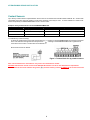
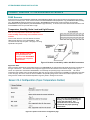
Up to five dry-contact sensors or liquid detection sensors can be connected to the terminals marked “DIGITAL IN”. Sensors with
16-26 AWG connection wires that operate on 5V at 10mA maximum current may be used. A contact resistance of 10kΩ or less
will be interpreted by the ENVIROMUX-MINI-LXO as a closed contact.
Examples of Dry-Contact Sensors for the ENVIROMUX-MINI-LXO:
NTI #
Description
NTI #
Description
ENVIROMUX-EBS
Emergency Button
ENVIROMUX-SDS-PA
Smoke Detection Sensor-Power added
ENVIROMUX-IMD-P
Infrared Motion Sensor w/power
ENVIROMUX-TDS
Tamper Switch
ENVIROMUX-M-DCS
Door Contact Sensor
To install the dry-contact sensor(s):
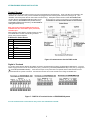
A. Attach the positive lead to a terminal corresponding to a "+" marking on the ENVIROMUX-MINI-LXO and the ground lead
to the next terminal to the right that will correspond to a “
“ marking on the ENVIROMUX-MINI-LXO. Tighten the set
screw above each contact. Terminal sets are numbered 1-5.
B. Mount the sensors as desired.
Figure 3- Terminal block for dry-contact sensors
Note: The terminal block is removable for easy sensor wire attachment if needed.
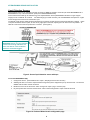
Shielded cable must be used to connect to the DIGITAL IN terminals in order to meet CE emission requirements.
Connect the drain wire of the shield to the ground (
) terminal of the dry contact in addition to the contact return wire.
5