1
Registration
We start by assuming that you managed to install the C3dEditor on your computer.
Look for the C3dEditor icon on your desktop and double-click on it to start the
C3dEditor program. If you can not find the icon then look for a Program Group
called Gait Lab and an entry titled MLS – C3D Editor. These are the standard
locations that will be configured when you perform a normal C3dEditor installation
which will install the application and its related demonstration files in the
C:\Program Files\MLS\C3dEditor\… directory tree.
If you have any problems at this point you can try removing the C3dEditor and
reinstalling it – the C3dEditor uninstall program is called REMOVE.EXE and can be
found in the same directory as the C3dEditor. It will uninstall the C3dEditor
application and remove all the C3dEditor specific registry entries. If you remove a
registered copy of the C3dEditor then you will have to enter the registration
information again when you reinstall the program.
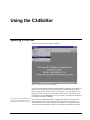
If you entered the registration information correctly during installation the C3dEditor
will display your name and location when it is started. If you made a mistake or did
not register the program then the opening screen will display a notice that the
program is an unregistered copy of the program.
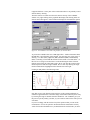
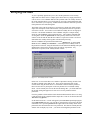
Figure 1 - An unregistered copy of the C3dEditor
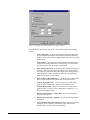
If you believe that you entered the correct registration details during installation then
you can register the program now by selecting the Registration option from the Help
menu and correcting any errors in the information that you entered. The Registration
information must be entered exactly as shown on your software license.
An unregistered copy will not allow you to view all analog channels or edit large
files and will keep reminding your that it’s unregistered. You will only be able to
view data in the first eight analog channels and will not be able to save any files that
contains more than 100 frames of 3D points or markers. Registered software has
none of these little annoyances.
8 • Contents
User Manual C3D Editor