1
Storage System Features
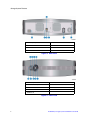
A. NIC Port (1 Gb)
E. Reset Button
B. e-SATA Port
F. A/C Power
C. USB Port 2
G. Chassis Cable Lock
D. USB Port 3
Figure 2. Rear View
A. NIC Activity LED
F. USB Port 1
B. Disk Drive Activity LED
G. Disk Drive 1 Status LED
C. Disk Drive 2 Status LED
H. Power/Status Push-button
D. Disk Drive 3 Status LED
I. Disk Drive 4 Status LED
E. USB Port 0
Figure 3. Front View
2
Intel® Entry Storage System SS4200-E User Guide