1
e500 Instruction Set Simulator
— sim_stderr: for standard error
— sim_stdall: for all the above streams
The <stream> parameter can be the word ‘term’ for a terminal or a file name. For example, to open an
sportal with the input directed from a file “my_stdin.txt” and the output directed to the terminal, the
following commands are used from the ISS command prompt:
>> sportal open
>> sportal sim_stdin my_stdin.txt
>> sportal sim_stdout term
For further usage of the sportal facility refer to the sportal user’s manual provided with the ISS in the
simPortal/doc directory.
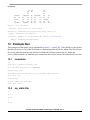
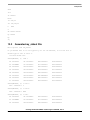
Two example sportal files are supplied with edink, one for file input/output (I/O) and one for emulated
terminal I/O.
6.2
Invoking the ISS with the Sportal
cd to appropriate directory
iss
source src/sportal_file or source src/sportal_term
go
6.3
sportal_file
sportal open
sportal sim_stdin src/my_stdin
sportal sim_stdout my_stdout
sportal sim_stderr my_stderr
ld obj/edink
6.4
sportal_term
sportal open
sportal sim_stdall term
ld obj/edink
Creating edink from DINK32 Code Using the e500 ISS, Rev. 2
8
Freescale Semiconductor