1
Operating Your Panel Heater
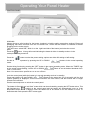
CONTROL PANEL
All Models
Always choose a safe location for the heater, keeping in mind the safety precautions outlined. Ensure all
packaging has been removed form the unit before use. Check that the heater is switched off before
plugging into the mains supply.
Turn the Power switch"ON“, which is on the right hand side of the heater just below the control
panel.
Press the
button. A beep will sound indicating the heater is either in standby mode or in the
mode prior to being turned off.
Press the
button to select the power setting; options are either full setting or half setting.
Set the desired temperature by pressing the UP or DOWN
mode.
buttons in the normal operating
Set the timing function by pressing the “SET” button in the normal operating mode, When the “TIMER” sign
on the screen starts flashing, use the UP or DOWN
buttons to set the desired shutdown time.
From 1 to 24 hours.
Note: You cannot set a specific turn on or turn off time.
Lock the control panel while the heater is in normal operating mode or in standby:
Press and hold the UP and DOWN
buttons at the same time (for 3 seconds) until the lock
symbol (padlock) is displayed. All the control functions are now locked, and the buttons will no longer
operate until unlocked.
Use the same sequence to unlock the control panel.
The heater is fitted with an “anti-frost” mode which can be activated by pressing the SET button twice. This
will illuminate the
symbol on the control panel and the heater will automatically come on if the
temperature drops below 7 degrees. Note the heater has to be turned on for this function to work. To
deactivate this mode press the SET button again.