1
Dartfish outputs - publishing & sharing
6.3.4
113
Step3 - Preview
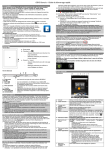
Step 3 of the wizard also allows you to preview the choices you have made in the previous
steps, including your personalization's and the quality of compressed video files.
To see a preview, click the Preview button. The preview will be displayed in your Browser or
in Dartviewer depending on the choices made.
6.3.5
Step4 - Publishing
The publishing step will depend on the destination.
My Computer
Choose or browse for the file location where the M ediaBook will be saved.
Email
There are no further choices. The files will be processed and a message displayed when
this has completed.
You may choose to attach the Dartviewer freeware to the email if it is being sent to
recipients who has not previously installed Dartviewer. They will receive instructions on
how to install Dartviewer.
CD/DVD
Final information about the CD/DVD burner to be used and a disc label are provided.
Clicking the N ext button will "burn" the CD or DVD.
FTP
An FTP profile is selected in this step and, if necessary, a password is entered. Clicking the
N ext button will publish the M ediaBook files to the selected FTP site so you should establish
- Version 6 -
© Dartfish. All rights reserved.