1
2
Finding & managing shows
Recording with Overlap Protection
Being able to record multiple programs at the same time doesn’t eliminate all possible
recording conflicts. The Overlap Protection feature gives you additional options for dealing
with recording conflicts when they occur.
If Overlap Protection is turned off, when two shows are scheduled to record on the same
tuner but overlap by a few minutes (for example, one program ends at 8:33, while the next
program begins at 8:30), the lower priority recording is cancelled. But with Overlap
Protection turned on, the TiVo DVR simply clips the lower priority recording by just enough
minutes to allow both programs to record.
Overlap Protection works by determining the priority of each program scheduled to record.
For repeating recordings, it uses the OnePass Manager to learn which programs have
higher or lower priorities (see Using the OnePass Manager). One-time recordings are not
listed on the OnePass Manager; these individual recordings that you schedule receive the
highest priority. The most recent individual recording that you requested always has the
highest priority. (TiVo Suggestions always have the lowest priority.)
When scheduling new recordings, the TiVo Roamio notifies you of any recording conflict
and gives you options for resolving it. If Overlap Protection is on, your options include
clipping the lower priority program.
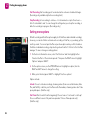
Overlap Protection is a global setting, not a show-specific choice. To set your Overlap
Protection preference, from the TiVo Central screen, choose ‘Settings & Messages,’ then
‘Settings,’ then ‘Recording,’ then ‘Overlap Protection.’
38