1
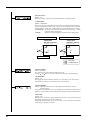
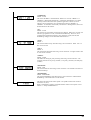
"COMMAND"
Default : AUTO
This selects the RML-1 command mode. When set to "AUTO," "MODE 1" or
"MODE 2" is determined automatically. If automatic determination is not made
correctly, find out what instruction system the application software (or driver
software) uses for data that is sent, and change this setting to "MODE1" or
"MODE2." To determine which mode your software is sending data in, refer to the
documentation for the software.
"I/O"
Default : AUTO
This sets the type of interface connected to the computer. When set to "AUTO," the
interface type (parallel or serial) is determined automatically. However, serial
communication parameters (baud rate, parity checking, stop bit, data bit, and
handshaking settings) are not determined and must be set.
"STOP"
Default : 1
This sets the number of stop bits when using a serial connection. Either 1 bit or 2
bits can be selected.
"DATA"
Default : 8
This sets the data bit length when using a serial connection. A length of either 7 bits
or 8 bits can be selected.
"PARITY"
Default : NONE
This makes the setting for parity checking when using a serial connection. The
available selections are no parity ("NONE"), even parity ("EVEN"), and odd parity
("ODD").
"BAUDRATE"
Default : 9600
This sets the baud rate when using a serial connection. The available selections are
9600 and 4800 bps.
"HANDSHAKE"
Default : HARDWIRE
This sets the handshaking mode when using a serial connection. Either hardwire
handshaking or Xon/Xoff control can be selected.
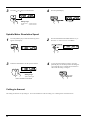
This shows the rotation time of the spindle. The spindle rotation time cannot be
returned to "0" (zero).
Refer to "Maintenance_Display of Spindle Rotation Time" in the separate "User's
Manual 1 -- Setup and Maintenance."
23