1
User's manual for elevator door controller SDK-500
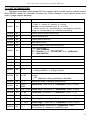
3.A. Selflearning [ execute ]
During the „Selflearning” procedure the controller will move the door from the fully open
position to the fully closed position (at low speed). During such a move all pulses are
calculated and stored into the controller memory. Counted pulses represent door width.
There is no need to enter any characteristic points of the door speed profile as
SDK-500 controller calculate these points automatically adjusting all movement
parameters for optimal door functionality. All parameters are set according to
meet regulations.
3.B. Diagnose [ execute ]
It is recommended to execute the „Diagnose” procedure on the new installation or after
door mechanism maintenance. SDK-500 will perform closing procedure three times and will
remember average current value during this operation which will be stored as a reference
value for „Threshold” parameter. During operation dirt and mechanical factors will cause
additional movement resistance which will influence the current value. As the controller is
monitoring current has a chance to detect and signal maintenance need.
3.C. Threshold, range: 0 ÷ 99 [ % ]
This parameter defines permissible percentage by which the average current value may
be exceeded during opening+closing cycle. This threshold value is stored in memory during
door installation or periodic door maintenance visit by the installer. Maintenance value of
current IM can be calculated using formula:
I M =I AV [mA] ×
100Threshold [% ]
100
where IAV - average current value of opening+closing cycle stored in memory while
installation or periodical door mechanism maintenance
If average current value of opening+closing cycle is greater than maintenance value of current
IM then present screen of the LCD display will be shown alternately with „Need service”
message.
4. Working modes
4.1. Driver mode, options: [ RS-485 lines / external inputs / automatic / manual ]
The SDK-500 controller is designed as a universal unit to be used with various 3 rd party
elevator control systems. To provide proper connection to different types of main controllers,
correct menu option must be chosen:
„
RS-485 lines
”
- systems control using RS-485 communication bus and
ModBus RTU protocol. It is required to provide proper data
transmission format and registers addresses.
„ external inputs” - systems control using separate {CLOSE INP.} and
{OPEN INP.} inputs.
22