1
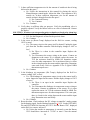
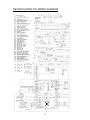
Assume the user wishes to control the fan speed using a variable frequency drive (VFD).
The VFD input is 0-10Vdc. The control variable will be building pressure. As the
building pressure increases, the fan speed should decrease. The building pressure
transducer has a range of –0.1” to +0.1”. The user would like the building pressure to be
+0.03” but does not want it to drop below 0.0” or go above +0.05”. The parameters
entered on the keypad display will be:
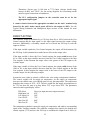
PID Select
High Input Val
Low Input Val
User Ctrl SP
Max User SP
Min User SP
Max User SP
Reverse (as input increases output decreases)
0.10
-0.10
0.03
0.05
0.00
.05”
0%
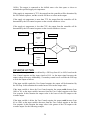
Input > .03”?
override
scaler
.03”
User Ctrl SP
100%
>
=
<
.03” PID 0-100%
.03”
0%
override
scaler
Min User SP
.00”
0-100%
Output
Input < .03”?
100%
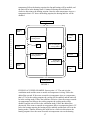
The pressure transducer compares the pressure outside the space to the pressure inside the
space and transmits a corresponding signal to the TracRite controller. The controller
compares this signal to the desired user control setpoint (0.03”) and uses the PID loop to
modulate the output from 0-100% (0-10Vdc). The output is connected to the VFD that
changes speed to maintain the specified building pressure.
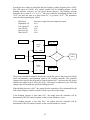
If the building pressure is 0.03”, the output from the controller will be determined by the
PID control sequence, and the override will have no effect on the output.
If the building pressure is more than 0.03”, the output from the controller will be
determined by the PID control sequence or the override whichever is less.
If the building pressure is less than 0.03”, the output from the controller will be
determined by the PID control sequence or the override whichever is more.
25