1
MP760 user manual
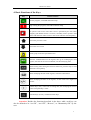
4. Basic Functions of the Keys
Key
Basic Functions
Run the program, with LED indication lamp
Stop running the program, with LED indication lamp
No matter what state the panel stays, once press down this key, return to
the system’s start screen. The start screen is specified by the user when
designing (the default screen is screen1). Normally set the system’s start
screen with the main menu screen or the screen which is used frequently.
Turn to the previous screen
Turn to the next screen
Search, jump to the user specified screen
Write the modified data into the register, then go on modifying the next
register, after the last one been modified, exit the modifying state.
Alarm list key, after setting the alarm list functions, press this key to enter
alarm list screen quickly.
When modifying the data of the register, clean the selected area.
When modifying the data of the register, set the value to be negative or
positive
Number keys (0-9), in the state of setting data, the modifying bit turns to
be the correspond key’s value
Function keys (F1-F6), common function keys
Attention: Besides the functions described in the above table, each key can
also be defined to be “set ON”, “set OFF”, “Reverse”, or “Momentary ON” by the
user.
5