1
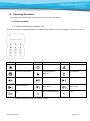
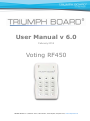
6.1.2) Button functions for student unit
The button functions are assigned as shown in the table below. These functions are enabled in
classroom mode only.
Icon
Function
Icon
Function
Icon
Function
Previous Question
Not assigned
Next Question
Entry of “1” or “A”
Entry of
“2” or “B”
Entry of
“3” or “C”
Entry of “4” or “D”
Entry of “5” or “E”
Entry of
“6” or “F”
Entry of “7” or “G”
Entry of
“8” or “H”
Entry of
“9” or “I”
Clearing of entry
Entry of “0” or “J”
Not assigned
* The button assignments cannot be set by the user
TRIUMPH BOARD a.s.
Page 13 of 19