1
2.2
Example ARM Linux Assembly Program
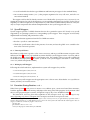
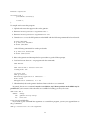
The support code for this lab contains an example ARM Linux assembly program, lab2/part1/exit/exit.S:
#include <bits/swi.h>
.file
.text
"exit.S"
.global _start
_start:
mov
swi
r0, #42
EXIT_SWI
The exit.S contains the minimum code necessary for a valid ARM Linux program—all it does is terminate
with exit status 42.
Notice that the source code file for this program has a .S suffix unlike previous labs, where assembly
code typically had a .s suffix. When gcc is called with a .S file, the source code is first preprocessed
with cpp (the C preprocessor) before being fed the assembler. This allows for the use of “#include”
and “#define” preprocessor directives in assembly source code.4 In particular, this code includes the
bits/swi.h header file which contains defined constants for each syscall you will use in this lab. Please use
these constants (e.g,. “EXIT SWI”) instead of specifying the syscall number directly.
2.3
Hello World in Assembly
For the first lab exercise, write a pure assembly version of “Hello world!” as lab2/part1/hello/hello.S
using the write and exit syscalls. Use the exit.S source code as a starting point, and consult the GNU
Assembler Programming Tips document on the course web site for tips of defining strings in assembly. You
may also want to take a look at lab2/part1/libc/include/bits/*.h for other defined constants that may
be useful in your program.
As in lab1, the “Hello world!” program should:
• Write the string “Hello world!” followed by a new line to stdout.
• Terminate with exit status 0.
Although it is a good practice to verify the return value of all syscalls, you may ignore the return value
for write syscalls in this program. Doing so assumes that there will not be a short write, but also dramatically simplifies the assembly code.
Please remember to compile your “Hello world!” program with the included Makefile, and verify that
the output is proper when executed. NOTE: You will need to remove the arm-linux- prefix in the Makefiles from the compilier and tool names to compile your code on the GUMSTIX.
3
Writing a C Library from Scratch
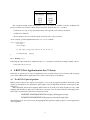
A statically-linked C library has four main components that form the basis of an operating system’s C
support code:
• A set of syscall wrappers that provides functions to interface C language code with each system call.
The actual work is performed by the syscall (or the handler for the syscall), the wrapper is used to
interface with user C code.
• A set of utility functions that use operating system specific syscall wrappers to implement the ANSI
C standard library API (e.g., printf, strcmp, etc.).
4 Source
code generated by GCC is already preprocessed, so GCC outputs a .s file that gets passed to the assembler directly when
gcc is later invoked on it.
5