1
CHAPTER 3. THE IVDS CUSTOM SYMBOLOGY AND MAKEBAR PRINTING SOFTWARE
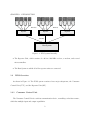
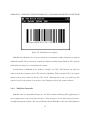
Figure 3.3: MakeBar screen capture.
MakeBar also allows the user to choose whether or not human readable characters are printed
within the symbol. These characters resemble the human readable format found on UPC symbols
which allow the data to be read without the scanner.
A final feature of MakeBar is the ability to “mangle” the CRC. This function was added in
order to check the robustness of the CRC detection algorithm. With a mangled CRC, the scanner
should read in correct data but fail the CRC check. Although this is not very useful once the
system is used by the sponsor, it provides a good debugging tool for the scanner software.
3.3.2
MakeBar Internals
MakeBar runs as a single-threaded process. As all Presentation Manager (PM) applications, it
uses an input queue to process window messages. These messages come in either keyboard, mouse,
or application specific formats. The only valid keystrokes for MakeBar are hot-keys which duplicate
27