1
MPR30-ENG User Manual
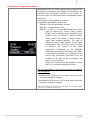
charging status
battery status
Tuning phase
power up phase
ON & RF Led Indicators
ON
RF
DISPLAY*
red
off
on
WHEN
when the receiver is
power on, during the
power up phase
when the receiver is
power on, after the
power up phase
red
off/on
on
red
red
on
fixed
green
red
on
fixed
green
green
on
after the tuning
phase, the
transmitter is
received
fixed
green
on/off
on
slow
blinking
green
fast
blinking
green
red
blinking
blue
blinking
green
fixed
green
white
on/off
on
on/off
on
off
off
off
off
off
off
off
off
green/
red
off
the batteries charge
of the receiver is
good (>25% lifetime)
the batteries charge
of the receiver is low
(<25% lifetime)
the batteries charge
of the receiver is very
low (<12% lifetime)
battery error
during batteries
charging
during batteries
charging
during batteries
charging
device in bootloader
mode**
when the receiver is
power on, during a
frequency change
phase (see Gr-Ch or
Frequency menu)
after the tuning
phase, no transmitter
is received
Rev. 14
MEANING
the receiver is not ready to
use, wait the status menu on
display
an error has occurred during
the boot phase. Power on
again the receiver. If the led
indicator ON continues to
remain red, contact Wisycom
repair service
the PLL is not locked on the
select frequency, wait for
lock ( about 1second or less)
the receiver is ready to use,
the batteries charge is good,
no transmitter is
synchronized with the
receiver, no output audio
available
the transmitter is correctly
tuned, the bars in the status
menu show the RF levels
received from antenna A and
B
the batteries charge of the
receiver is good
change or put on charge the
batteries as soon as possible
change or put on charge the
batteries immediately
change the batteries
the batteries are charging
(<90% of complete charge)
the batteries are charging
(≥90% of charge reached)
charge complete
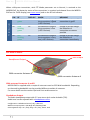
*DISPLAY indicate the state of OLED display before the OFF timeout
** to put the MPR30-ENG in boot mode: power on the device push and keep both UP and DOWN
buttons for few seconds (until the led indicators light up, then release the buttons)
7