1
playing situation. After the “cold boot”, the adapter will
operate in Simple Mode1.
After the iPod is disconnected, the display will show
CD
LOAD CARTRIDGE
again, independent of
whichever mode the adapter was operating in.
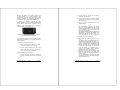
In Simple Mode operation, the iPod can be controlled by
the HU as well as the audio controls on the steering
wheel, as shown in Table 3.
HU button
(Simple Mode)
3.2.3 Simple Mode
!
iPod operation
(Simple Mode)
Yes
Advances
to
previous song
(next track)
In Simple Mode the iPod can
be controlled manually as
you would normally do. As
soon as the iPod channel is
selected on the HU (using the
source knob), the iPod
starts playing and then
pauses when the channel is
deselected.
The iPod will also pause if the HU is interrupted, e.g. by a
telephone call (if you have telephone mute or the
integrated carphone/ hands free kit installed) or by a
traffic announcement via the radio (if TP has been
enabled). Once the interruption is finished the iPod
resumes playing.
Important!
Steering
Wheel
control
Yes
Always connect the iPod to the adapter
when the iPod is paused.
The adapter expects this and will
otherwise reverse the Play / Pause
operation.
(prev track)
Advances to the next
song
the
n/a
Scrolls
through
the
current song in forward
direction
n/a
Scrolls
through
the
current song in reverse
(rewind)
direction
Table 3: HU control of the iPod in Simple Mode
(fast forward)
3.2.4 Advanced Mode
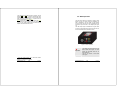
In the Advanced Mode, the
iPod is locked and displays
the iMIV-Volvo logo; the
iPod cannot be manually
operated. All iPod control is
accomplished by using the
HU buttons and all relevant
information is shown on the
HU display.
The Advanced Mode of the iMIV-Volvo adapter is used to
access the playlists on your iPod, of which up to 99 are
supported by the adapter.
1
Some iPod’s require to have the Play button pushed
manually after a ‘cold start’.
© Sensolutions, Inc.
3-8
Chapter 3
User Manual
© Sensolutions, Inc.
3-9
Chapter 3
User Manual