1
User’s manual
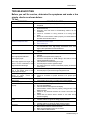
TROUBLESHOOTING
Before you call for service, determine the symptoms and make a few
simple checks as shown below.
TV set:
SYMPTOMS
POSSIBLE CAUSES
Power does not turn ON
??
There is no picture or sound
??
??
??
??
The screen is greenish while using ??
D-Sub to Component cable
There are spots on the screen
??
??
Degraded colors or tints
??
Improper screen position or size
??
The image appears distorted
The image is purple
??
??
The image appears too bright, and ??
there is a loss of definition in the ??
??
brightest areas of the image.
The image appears too 'washed
out', or the darkest areas of the
image appear too bright.
If “xxx searching” appears, the
image or signal cannot be
produced by display.
Power indicator lamp appears
flashes blue
“Out of range” appears
Remote Control does not function
properly
??
??
??
??
??
??
??
??
??
??
??
??
??
There is no picture or sound, just
noise.
Picture is not clear.
No sound
??
??
??
??
??
??
??
??
Ensure whether the power plug is securely inserted into the
receptacle.
Ensure the LCD TV power is ON (Indicated by the blue LED on
the front of the unit)
Reception other than those of broadcasting stations can be
considered.
Check for connection to wron g terminal or for wrong input
mode.
Ensure the communication cable is properly connected between
the Video Source and the LCD TV.
Check whether you select the right input. The screen will be
greenish if choose PC input.
Select YPbPr input.
Check whether your AV equipments is affected by interference
from automobiles, trains, high-voltage transmission lines, neon
signs or other potential sources of interference.
Check whether all image adjustments have been properly
adjusted.
Check whether screen position and size have been properly
adjusted.
Ensure the TV's aspect ratio is properly set.
Check the "Component" or "RGB" setting in the LCD TV and set
it for the appropriate signal type.
Check whether the contrast setting is too high.
The DVD player is set for a high-level output.
The video signal has not been terminated properly somewhere
in the system.
Check whether Brightness is set too high.
The DVD player may be set at too high a brightness level.
Check the cable for disconnection.
Check for connection to proper terminal or for proper input
mode.
Check the cable for disconnection.
Check whether the screen is on power saving status (DPMS)
Check whether the input signal is acceptable to the display.
Check for incorrect battery orientation.
Check for dead batteries
Check for distance and angle from the display.
Check whether remote control is properly being pointed at the
display’s receiver.
Check for any obstacle between the remote control and the
display.
Check that the remote sensor window is not under strong
fluorescent lighting.
Make sure the antenna cable is properly connected.
Consider whether TV signals are being properly received.
Make sure the antenna cable is properly connected.
Consider whether TV signals are being properly received.
Check whether you have selected “Mute” for Audio setting.
Make sure the volume is not set to minimum.
Make sure that headphones are not connected.
Check cables for disconnection.
Troubleshooting 47