1
Chapter 4
Process Control Examples
Manual-Automatic Control Example
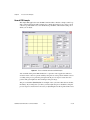
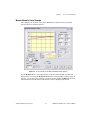
This example is an extension of the general PID simulator that demonstrates switching
between automatic and manual modes.
Figure 4-2. The User Interface of the Manual-Automatic Control Example
Use the Manual switch to switch between the two modes. When the PID controller is in
manual mode, you can use the Manual Control knob to control the PID controller output. At
any time, you can change the controller to automatic mode by turning the Manual switch off.
The transition between the manual and automatic modes is bumpless and smooth.
© National Instruments Corporation
4-3
LabWindows/CVI PID Control Toolkit User Manual