1
The Edit Menu: DELAY Tab
DUCKING AMOUNT
LEAD LEVEL
DUCKING TIME
Note that the LEAD EFFECT SENDS parameter on the
PRESET tab must be set to PRE in order for any signal to
get to the effect block when LEAD LEVEL is set to OFF.
This sets how much attenuation (gain reduction) is
applied to the delayed signal when a vocal is present.
For ducking to not be too obvious, a slight reduction of
-6 dB is best. The DUCKING parameter must be set to
ON for this to have any effect.
Ducking time sets how long it takes to ramp up the delay
level at the end of vocal phrases.
Controls the lead (dry + Tone) voice level when
the individual effect is turned on with its respective
footswitch. This allows a unique wet/dry mix for
individual effects. When multiple effects are active, the
lowest LEAD LEVEL value will determine the value.
LEAD TO DLY
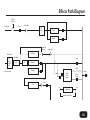
Sets the amount of lead voice sent into the Delay block.
HARM TO DLY
Sets the amount of harmony level sent into the Delay
block. The HARMONY footswitch must be on to feed
this send.
UMOD TO DLY
This allows you to feed the delay block with the effected
output of the µMod block. The µMod footswitch must
be on to feed this send.
59