1
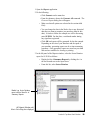
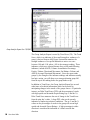
TradingExpert Pro provides the tools The majority of investors use a bottom-up approach to stock selection. They find particular stocks that interest them, possibly from a fundamental story or a mention in Investors Business Daily, and then proceed to analyze those stocks. A secondary consideration may be whether or not the stocks are in attractive industry groups. The original AIQ software only provided tools for bottom-up investing, with products limited to screening stocks and reporting those with high Expert Ratings. However, with the 1992 release of AIQs original TradingExpert, tools for top-down stock selection utilizing industry group and sector analysis were integrated into the software. Industry group analysis is based on the fact that all stocks in a particular industry tend to be in favor or out of favor at the same time. Since, very often, a bad stock in a good industry group outperforms a good stock in a bad industry group, knowing which groups are in and out of favor can be quite advantageous. The sector and group features contained in TradingExpert are designed to provide the user with the ability to follow industry groups and to determine which groups are currently moving in and out of favor. Then, with TradingExperts Explore feature, finding the best stocks to trade within the selected groups is a simple matter. With top-down stock selection, the initial screening step is not concerned with individual stocks but with industry sectors and groups (a sector is a set of groups). Although you may have 1500 stocks in your data base, you are only concerned with those stocks in the most attractive industry groups. TradingExpert provides analysis reports on industry groups that are helpful for investors who prefer to buy into a trend as well as for those who like to buy near the low. Lets look at an example. View Market Log for sector rotation The easiest method of spotting sector rotation is to follow the daily Sector Rotation report (In previous versions, this report was part of the Market Log Report). To display this report on your screen, follow these steps: 54 New Users Guide