1
1
Enjoying TV
For details, refer to the operating
instructions of the TV.
TV
AV
TV
BD
DVD
?/1
SYSTEM STANDBY
SAT/CATV DMPORT
VIDEO1 VIDEO2 VIDEO3
/CLEAR
/ENTER
DISPLAY
RETURN/
EXIT
TUNER/
BAND
GUI MENU
HOME
2
3
4
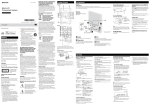
Turn the system on.
Press TV (white) on the remote.
Adjust the volume of the system.
Tips
• When you connect a Sony TV, the audio input of the
TV is switched and the image from the TV tuner is
displayed on the TV screen automatically by pressing
the TV (white) button. To change this setting, see
“Changing the input button assignments of the
remote” (page 75).
• The sound may be output from the TV’s speaker. In
this case, turn the volume of the TV’s speaker down
to the minimum level.
TOOLS/
OPTIONS
MENU
PRESET
PRESET
TUNING
TUNING
TV
2 +/–
PROG
THEATRE
SOUND
FIELD
BD/DVD
TOP MENU MENU
DIGITAL ANALOG
SYSTEM
MENU
F1
F2
AUDIO
49GB
Playback Options
TV
(white)
Turn on the TV and choose a program.