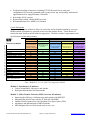
1
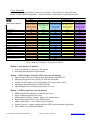
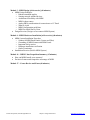
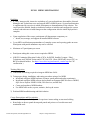
Module 0 - Introduction (15 minutes) Course Ground Rules, Objectives, and Agenda Participant Introductions and Expectations Module 1 - Molex Premise Networks (MPN) Overview (45 minutes) Improving the efficiency of infrastructure deployments with INSIGHT Integrating the physical layer into the IT Network with MIIM Outdoor wireless connectivity with Canobeam Free Space Optics (FSO) Advantages and differentiators of MPN Solutions MPN Integrated Service Desk stands ready to serve you Module 2 - MIIM System Overview (30 minutes) MIIM simplifies the automation of the Physical Layer Issues in Managing the Physical Layer Monitoring the complete channel / end-to-end / channel states Benefits and unique features of the MIIM System MIIM Architectures : Cross-Connect & Inter-Connect System Overview: scanner, patch panels with LEDs, outlet terminator, application Why a MIIM Cat 6A Shielded Solution? Module 3 - MIIM Design [with exercise] (60 minutes) MIIM Design Principles o Ethernet standards applies o Sensing network attached devices o Architectural flexibility with MIIM o MIIM in data centers o Analog PBXs considerations & connection to a CC Panel o What to Avoid o MIIM Configuration guidelines o MIIM Pre-Install Survey Form Design Exercise (Design a cross-connect MIIM System) Module 4 - MIIM Hardware Installation [with exercise] (60 minutes) MIIM System Installation Procedure o Scanner & MIIM Patch Panels (Copper and Fibre) o Grounding of MIIM Scanner and Patch Panels o Important Safety notices o Hardware installation verification o Outlet Terminators Installation Exercise (Build a MIIM System) Module 5 - Recognizing the MIIM Scanner in the LAN [with exercise] (30 minutes) Physical interface (status lights, firmware, confirmation of scanner-server interface and scanner-patch panel interface) Scanner web interface (home screen / scanner debug / configuration and parameters) Software interface (firmware & application versions) © Molex Incorporated, 2010 All Rights Reserved Subject to change without notice MPN.Support@molex.com