1
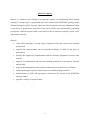
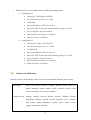
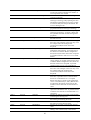
Application
apply,
change,
compute,
construct,
demonstrate,
discover,
dramatize, employ, illustrate, interpret, investigate, manipulate,
modify, operate, organize, practice, predict, prepare, produce,
schedule, shop, sketch, solve, translate, use
Analysis
analyze, appraise, break down, calculate, categorize, compare,
contrast, criticize, debate, determine, diagram, differentiate,
discriminate, distinguish, examine, experiment, identify, illustrate,
infer, inspect, inventory, outline, question, relate, select, solve, test
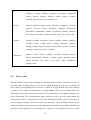
Synthesis
arrange, assemble, categorize, collect, combine, compile, compose,
construct, create, design, devise, explain, formulate, generate,
manage, modify, organize, perform, plan, prepare, produce, propose,
rearrange, reconstruct, relate, reorganize
Evaluation
appraise, assess, choose, compare, conclude, contrast, criticize,
decide, discriminate, estimate, evaluate, grade, interpret, judge,
justify, measure, rate, relate, revise, score, select, summarize,
support, value
3.4.
Error codes
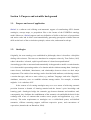
SkOwl includes certain error handling and identifications routines. Generally, the user is
provided with a message when an error occurs, which includes an error code to identify an
error, and the corresponding sub or function is closed. The logic behind error code format is
as follows: Error codes are displayed as five-digit numbers. The first two digits denote the
.NET framework system.component.windows.forms model entity of the application (short, the
forms component). The following three digits denote the sub or function within which the
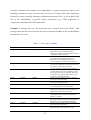
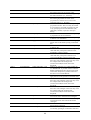
error occurred. Table 3.1 lists the error codes used in SkOwl Generally, there are two types of
error messages, warnings and errors (stated in the messages’ titles). Warnings indicate errors
which occurred by an incorrect use of the application and which do not fatally influence the
execution of the application or the integrity of a project. Errors indicate fatal errors which
38