1
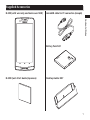
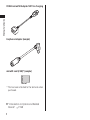
Contents/Notes 3.If the device causes radio interference to specified low power radio stations or amateur radio stations, contact "General Inquiries" described on the last page of this manual. Handling the FeliCa Reader/Writer The FeliCa reader/writer function of the terminal handles delicate signals that require no radio station license. The 13.56 MHz frequency band is used. If there is another reader/writer near the terminal, keep enough distance between the terminal and the reader/writer. Also, make sure that there is no radio station using the same frequency band nearby. Samples (microUSB Cable for PC Connection, microSD Card and Earphone Adapter) Keep away from liquids and moisture. The microUSB cable for PC connection, microSD card and earphone adapter are not waterproof. Do not use these devices in the rain or in other humid places (e.g. bathrooms). When carrying handset near your body (pockets, etc.), moisture from sweat may corrode internal parts and cause malfunction. Do not place near an air conditioner vent. Condensation may form due to abrupt temperature changes, leading to internal corrosion and malfunction. 34 Maintain metal terminals in a clean state. Clean with a dry, soft cloth (for glasses, etc.). Do not scratch, touch, or short-circuit the metal terminals. Doing so may erase data or cause malfunction. Clean the terminals of the microUSB cable for PC connection and earphone adapter with a dry cotton swab periodically. Soiled terminals may cause poor contact, resulting in insufficient charging or the terminal to turn off. Take care not to damage the terminals when cleaning. Do not hang or pull the terminal by the microUSB cable for PC connection. Charge in a place with adequate temperature (5°C to 35°C). Do not charge in the following places: •• Places with much humidity, dust, or vibration •• Near a telephone, TV, radio, etc. Although the microUSB cable may become warm during charging, it is not a malfunction. You can continue using it. Do not subject to strong impacts. Do not deform the USB connector of the microUSB cable for PC connection. Doing so may cause malfunction. Use only the force necessary when inserting/removing the microSD card.