1
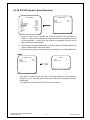
4.5 2D &3D NR (Dynamic Noise Reduction)
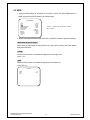
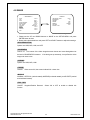
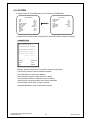
** MAIN MENU **
LENS
AGC
WDR
WHITE BALANCE
2DNR & 3DNR
DAY / NIGHT
SHUTTER
IMAGE
EFFECT
SYSTEM
EXIT
** 2DNR & 3 DNR **
SET<┘
AUTO
WDR<┘
ATW
SET<┘
COLOR
MANUAL<┘
SET<┘
SET<┘
SET<┘
2DNR
3DNR
RETURN
ON<┘
ON<┘
EXIT
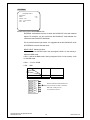
Sub-Menu under 2DNR & 3DNR mode.
1. When the noise level is reduced, the camera performance can apparently be
improved. When recording digitally, the image file size can be lessened by selecting
the noise reduction. As the level of gain changes, the background noise in the low
light level decreases automatically.
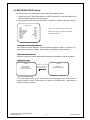
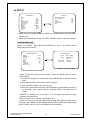
2. Please use the UP and DOWN buttons to 2DNR & 3DNR on the MAIN MENU and
press the ENTER button to do further setups.
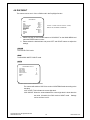
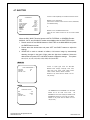
3. Please select the mode you would like to set by pressing the UP and DOWN buttons.
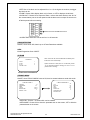
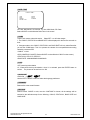
*2DNR
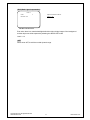
** 2DNR**
** 2DNR & 3 DNR **
2DNR
3DNR
RETURN
LEVEL
RETURN
ON<┘
ON<┘
3
EXIT
EXIT
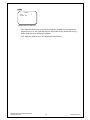
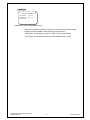
Sub-Menu under the 2DNR mode
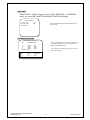
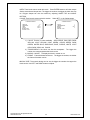
Sub-Menu under 2DNR & 3DNR mode.
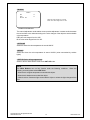
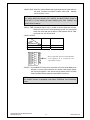
•ON: When the 2DNR is set to ON, there’s a submenu available for level adjustment,
ranged from 1 to 4. The higher the level, the more noise can be reduced but sharpness
will decrease.
•OFF: When the 2DNR is set to OFF. Noise will not be reduced.
Copyright © 2010. All Rights Reserved.
www.okinausa.com
14
REV122010-V17