1
Getting Started Digital Control Valves
Table of contents
7 Adaptation to special applications ........................................................32
7.1
7.2
7.3
7.4
7.5
7.6
7.7
7.8
7.9
Changing the control modes (pressure control, pQ Control, delta p, flow control) ........... 32
Changing the source of the Q setpoint value ......................................................................... 33
Changing the source of the control word ............................................................................... 34
PDO monitoring / watchdog activation ................................................................................... 34
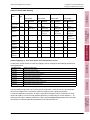
Changing the default PDO mapping ........................................................................................ 35
Event handler............................................................................................................................. 39
Data logger, function generator ............................................................................................... 39
Configuration of fault reactions ............................................................................................... 39
Pressure control ........................................................................................................................ 40
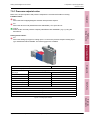
7.9.1 Pressure setpoint value................................................................................................ 41
7.9.2 Pressure actual value interface .................................................................................... 43
7.9.2.1 Example of configuring an analog pressure actual value transducer...... 45
7.9.2.2 Example of configuring a fieldbus pressure transducer .......................... 47
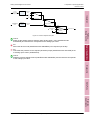
7.9.3 Control mode p and p/Q control ................................................................................... 48
7.9.4 Adjustment of the pressure controller to the application .............................................. 51
8 Diagnostics / troubleshooting ...............................................................54
8.1
8.2
8.3
8.4
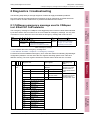
CANopen emergency message used in CANopen incl. EtherCAT CoE networks .............. 54
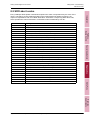
SDO abort codes ....................................................................................................................... 55
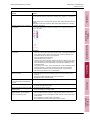
Diagnostics / troubleshooting fieldbus EtherCAT ................................................................. 58
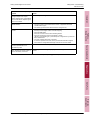
Diagnostics / troubleshooting valve application .................................................................... 62
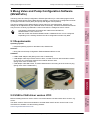
9 Moog Valve and Pump Configuration Software (MoVaPuCo) .............66
9.1 Requirements............................................................................................................................. 66
9.2 USB to CAN driver version VCI3 .............................................................................................. 66
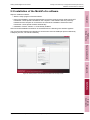
9.3 Installation of the MoVaPuCo software ................................................................................... 67
9.3.1 Help function of the MoVaPuCo ................................................................................... 68
10 Example applications with different network masters ........................69
10.1 CANopen network with Moog MSC II....................................................................................... 69
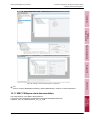
10.1.1 MSC CANopen stack documentation........................................................................... 70
10.2 EtherCAT network configuration with TwinCAT master........................................................ 71
10.2.1 Exchanging an existing valve in the network configuration .......................................... 78
10.2.2 SDO parameter exchange to PLC................................................................................ 79
10.2.3 Custom-defined PDO configuration.............................................................................. 80
10.2.4 PDO receive watchdog................................................................................................. 82
10.3 Profibus, S7 / Siemens.............................................................................................................. 84
11 Abbreviations / Units ..............................................................................87
Application Instruction DCV (CDS45379-en; Version -, August 2015)
ii