1
70
4.7. INTERACTION
where Left is the left mouse button, Middle is the middle mouse button, Right is the right
mouse button, and Shift is the shift key, which are either on or off.
drag(From, To, Buttons) - A mouse drag from object From to object To, with the mouse
buttons Buttons.
key(Object, Key) - A key Key has been pressed with the mouse cursor over object Object.
linger(Object) - The mouse cursor is resting over an object Object.
menu(MenuContext, MenuText) - An item from a menu MenuContext with menu text
MenuText has been selected.
move(Object, Buttons) - The mouse cursor has moved over an object Object, with mouse
buttons Buttons.
4.7.1
Disambiguating Actions
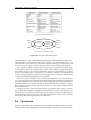
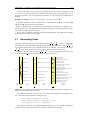
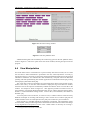
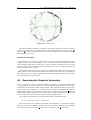
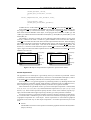
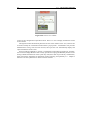
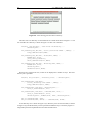
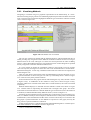
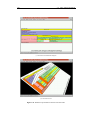
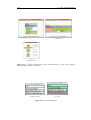
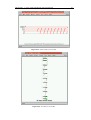
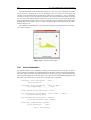
It will often be the case that there is more than one object beneath the mouse cursor, perhaps
because the objects are nested, or because the ‘line of sight’ beneath the mouse cursor intersects
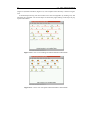
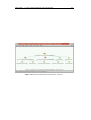
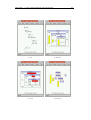
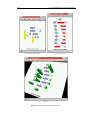
several objects. These two cases are illustrated in Figure 4.19.
Figure 4.19. Ambiguous mouse input. The mouse cursor indicates more than one object, so the
system must decide which the user intended.
The rule for selecting actions is to allow only one visual object to be subject to interaction,
so the user’s input generates just a single action term. When objects are nested, the innermost
object in the nesting is given precedence. The action/3 predicate is queried to determine if an
action exists for that object. If not, its containing object is queried until an object with an action
is found.
In the 3-D case, the mouse position will indicate a line intersecting the scene, rather than just
a single point as in the 2-D case. The camera position indicates the view frustum and is stored
as a position vector, and three orthogonal unit vectors forming a coordinate frame for the viewer.
The mouse position is indicated by a vector perpendicular to the plane of the viewer extending
along the z-axis of the viewer. This line is transformed from the viewer’s coordinate frame to the
scene graph’s coordinate frame, and objects in the scene graph are tested for intersection with
this line. The geometry for such transformations can be found in [31].
In general a bounding-box intersection test with the line is all that is needed. By calculating
the distance from the object to the viewer, precedence of actions can be given to objects that are
nearest the viewer. Not every visual object in the scene needs to be tested. Because objects are
often nested, child objects need only be tested if the line intersects their parent object.
Once the correct action is found, its reaction is executed by the reaction/2 predicate.