1
5,995,920
9
10
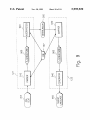
“Shared” objects are stored in “shared” libraries. Library
the user to modify the CSL Word to ensure that it is in the
appropriate form. HoWever, there are some cases in Which
types include “shared” graphic libraries 460a, “shared”
tables libraries 460b, “shared” text libraries 460C, “shared”
audio libraries 460d, and “shared” video libraries 4606‘. A
shared object is stored only one time. When used in indi
the vocabulary checker (described beloW), Which does no
shared object Will be placed in the information shared ?le
parsing of a document, Will not be able to identify the correct
form to provide. Consider the folloWing caption, in the case
Where the verb “vieW” is not in CSL, but has the CSL
synonym “see”:
450. This minimizes the amount of disk space that Will be
Direction of Crankshaft Rotation (When vieWed from
vidual information elements, only “pointers” to the original
required. When the original object is changed, all those
information elements that “point” to that object are auto
matically changed. A shared object can be used in any
?yWheel end)
10
The Vocabulary Checker Will not knoW if “saW” or “seen”
should be offered as a synonym for “vieWed.” Of course, in
this case a reasonable course of action might be to offer both
publication type.
A“shared information element” is an information element
possibilities and alloW the author to choose the appropriate
that is used in more than one document. For example, the
one. Because there is no certainty that every case Will alloW
same four information elements in release library 470 are
15 a presentation that enables the author to order a direct
used to create portions of documents 480 and 485.
replacement. LE 1330 provides a list of replacement options
All communication betWeen the author and the LE 1330
in the correct form Where possible. There may be cases,
Will be mediated by an LE User Interface (UI), implemented
though, When the author Will ?nd it necessary to edit a
as either an extension of standard SGML Editor facilities
suggested CSL Word or phrase before requesting that it be
such as menu options, or in separate WindoWs. The UI
put into the document.
provides and manages access to and control of the CSL
Finally, the LE UI provides support for disambiguating
checkers and CSL vocabulary look-up, and it is the primary
the meaning of sentences. It does this by providing a list of
tool enabling users to interact With the CSL LE. Although
possible alternative interpretations to the author, alloWs the
author to select the appropriate interpretation, and then tags
the term “user interface” is often used in a more general
the sentence so as to indicate that authors selection.
sense to refer to the interface to an entire softWare system,
25
here the term Will be restricted to mean the interface to the
C. File Management System
CSL checkers, vocabulary look-up facility, and the disam
biguation facility.
The File Management System (FMS) 110 serves as the
authors’ interface to the IE Release Library 470 and the
SGML text editor 140. Typically, authors Will select an IE to
edit by indicating the ?le for that IE in the FMS interface.
Among other things, the UI must provide clear informa
tion regarding (a) the actions the LE is taking, (b) the result
of these actions, and (c) any ensuing actions. For example,
Whenever an action initiated through the UI introduces more
than a very brief, real-time pause, the UI should inform the
author of a possible delay by means of a succinct message.
The author can invoke LE functionality by choosing an
option from a pull-doWn menu in text editor 140. The
available options alloW the author to initiate and vieW
feedback from CSL checking (both vocabulary and grammar
checking) and from vocabulary look-up. The author can
request that checking be initiated on the currently displayed
document or request vocabulary look-up on a given Word or
35
The FMS 110 Will then initiate and manage an SGML Editor
session for that IE. Finished documents Will be forWarded to
a human editor or Information Integrator via FMScontrolled
facilities.
D. Constrained Source Language (CSL)
Given the complexity of today’s technical documentation,
high quality machine translation of natural language uncon
strained texts is practically impossible. The major obstacles
phrase.
to this are of a linguistic nature. The crucial process in
The UI Will clearly indicate each instance of non-CSL
language found in the document. Possible Ways of indicating
non-CSL language include the use of color and changes to
font type or siZe in the SGML Editor WindoW. The UI Will
display all knoWn information regarding any non-CSL Word.
For example, in appropriate cases the UI Will display a
message saying that the Word is non-CSL but has CSL
translating a source text is that of rendering its meaning in
synonyms, as Well as a list of those synonyms.
In cases Where a Vocabulary Checker report includes a list
of alternatives to the non-CSL Word in focus (for example,
spelling alternatives or CSL synonyms), the author Will be
able to select one of those alternatives and request that it be
automatically replaced in the document. In some cases, the
author may have to modify (i.e., add the appropriate ending)
the selected alternative to ensure that it is in the appropriate
form.
When an author requests vocabulary information, the UI
Will display spelling alternatives, synonyms, a de?nition,
and/or a usage example for the item indicated.
The author can move quickly and easily betWeen checker
information and vocabulary look-up information inside the
UI. This enables the author to perform information searches
(e.g., synonym look-up) during the process of changing the
the target language. Because meaning lies under the surface
of textual signals, such overt signals have to be analyZed.
The meaning resulting from this analysis is used in the
process of generating the signals of the target language.
Some of the most vexing translation problems result from
those features inherent in language Which hinder analysis
and generation.
A feW of these features are:
1. Words With more than one meaning in an ambiguous
context
Example: Make it With light material.
[Is the material “not dar ” or “not heavy”?]
2. Words of ambiguous makeup
Example: The German Word “Arbeiterinformation” is
either
“Information for Workers” [Arbeiter+Information] or
“formation of female Workers” [Arbeiterin+
Formation]
3. Words Which play more than one syntactic role
Round may be a noun (N), a verb (V), or an adjective
(A):
documents to remove non-CSL language.
(N) Liston Was knocked out in the ?rst round.
In most cases, the UI provides automatic replacement of
non-CSL vocabulary With CSL vocabulary, With no need for
(V) Round off the ?gures before tabulating them.
(A) Do not place the cube in a round box.