1
Amplifier Panel and Display
3.
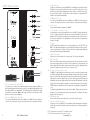
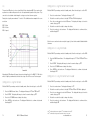
This input is to be used when connecting the GXW-15 to an AV amplifier/ receiver. When using the
LFE input, the crossover function in the menu/ set-up is not used. This is due to the crossover
function being controlled by the AV amplifier/ processor to which it is connected. Please refer to
the crossover table on page 11 for further advice on which setting to use. Input between LFE
and Stereo input is switched automatically.
1
4.
4
5.
5
6.
7.
12
13
11
1.
Notes:
1. SILKSCREENED COOL GREY 1c
2. IMAGE FOR REFERENCE PURPOSES ONLY.
3. VERSION 4
RCA Line Level Inputs (Stereo Left & Right)
For connection to a 2 channel/ stereo amplifier system. Connection should be provided by a
pair of high-quality signal cables from the pre-out section of an amplifier. Switching between the
Stereo input and LFE is done automatically. The LFE will take priority if a LFE and Stereo signal
is presented at the same time. Note:- cable lengths should not exceed 10 metres to avoid
interference from other electrical appliances.
2.
RCA Line Level Outputs (Stereo Left & Right)
To be used to feed additional sub-woofers in addition to the GXW-15 by ‘daisy chain’ type
connection. The outputs are link out only connections and do not provide any form of filtering.
Power LED
This LED indicates that the mains power is connected and turned on. If the LED is RED, the
GXW-15 is in stand-by mode waiting to receive an audio signal, an instruction from the encoder/
remote or a signal from the 12v trigger. If it is green, the unit is operational and the display will
show a single red dot (default operational display).
8
10a
12 Volt Trigger Input ~ Centre Pin = +12Vdc.
For external power control from AV amplifier/ Receiver to the GXW-15 (2 metre lead supplied).
This 12 volt signal is supplied by the AV amp/ receiver and tells the GXW-15 to turn on from
standby mode. This allows a more accurately controlled method of the auto on/ off function. It is
also a lot more energy efficient. The stand by function on the remote will not be operable when
using the +12v trigger. 7
10
USB Connector
This is provided to update the firmware in the GXW-15. 6
9
LFE Output/ Link (RCA Type)
To be used to feed additional sub-woofers in addition to the GXW-15 by ‘daisy chain’ type
connection. The output is a link out only connection and does not provide any form of filtering.
2
3
LFE Input (RCA Type)
8.
Voltage Selection Switch
Factory preset to suit the voltage of the country of origin. This should not be adjusted.
9.
Mains Power Switch
Mains ‘rocker switch’ providing overall power off and on/ auto. In the on/auto mode, the unit will
turn on when an input signal is sensed or the encoder/ power button on remote pressed, and
will turn off after 10 minutes when the signal is removed (source turned off). Alternatively, when
using the 12v trigger (see above), when the source is turned on or off.
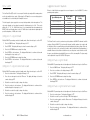
10. IEC Mains Power Connector/Fuse Location
The GXW-15 is supplied with a two-pin mains input socket for connection to the mains supply.
Use ONLY the appropriate IEC mains lead provided with the product. Also fitted is an external
mains fuse. If a fuse blows during operation a spare fuse is provided within the fuse holder for
replacement. If you wish to change the fuse, you can do this by removing the IEC mains lead
and carefully levering out the original fuse from its holder below the IEC mains input socket (10a,
opposite). If the fuse blows again it is advisable to seek help from an authorised service agent.
DO NOT attempt to re-fit a further fuse as this could result in serious damage to the amplifier unit.
11. Display
The default operating display will show a single dot in the middle. When powering up it will run
through a set cycle showing the input and the preset being used. For full details of the menu
system, please refer to page 10
12. LEO Microphone Input
Used to set the sub woofer up to adjust for the room acoustics. Refer to page 9.
13. Push-Turn Control Button Encoder
This gives you control of your GXW-15. You can adjust the volume (by turning the control button)
and enter the menu system. Pushing the rotary encoder allows access of the menu system (refer
to page 10).
*LEOTM and Listening Environment OptimizerTM are Trade Marks of D2Audio®.
LEOTM and D2Audio are Registered Trademarks of Intersil Corporation
4
GXW-15 Owners Manual
monitoraudio.com
5