1
Table of Contents
Preface .............................................................................................................................................. 1
Chapter 1 Product Introduction ..................................................................................................... 2
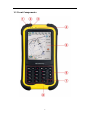
1.1 Front Components .............................................................................................................. 3
1.1.1 Keypad ...................................................................................................................... 5
1.2 Back Components ............................................................................................................... 6
1.3 Bottom Components ........................................................................................................... 7
Chapter 2 Basic Operation ............................................................................................................. 8
2.1 Turning on、Suspending、Turning Off、Resetting............................................................ 8
2.1.1 Turning on ................................................................................................................ 8
2.1.2 Suspending ............................................................................................................... 8
2.1.3 Turning off ................................................................................................................ 9
2.1.4 Resetting................................................................................................................... 9
2.1.4.1 Performing a Hard Reset ............................................................................. 10
2.1.4.2. Performing a Factory Reset ........................................................................ 10
2.2 Pull the Stylus out and in................................................................................................... 10
2.3 Installing、Uninstalling the SIM、TF Card and Battery .................................................... 10
2.4 Charging the Battery ......................................................................................................... 11
2.5 Fitting the Hand Strap ....................................................................................................... 12
Chapter 3 Connecting and Synchronizing with Your Computer ................................................... 13
3.1 Installing Connection Management Software ................................................................... 13
3.1.1 Installing Windows Mobile Device Center ............................................................. 14
3.1.2 Installing ActiveSync ............................................................................................... 14
3.2 Connecting and Synchronizing With Your Computer ........................................................ 15
3.2.1 Managing the Connection and Synchronization Using the Windows Mobile Device
Center .............................................................................................................................. 15
3.2.2 Managing the Connection and Synchronization Using MicroSurvey Transfer ....... 19
3.2.3 Connecting with U Disk Mode ................................................................................ 28
3.2.4 OTG Connection ..................................................................................................... 29
Chapter 4 Brief Description of the Operating System .................................................................. 30
4.1 System Main Interface and the Start Menu ...................................................................... 30
4.2 Status Indicators ................................................................................................................ 32
4.2.1 Battery Status Indicators ........................................................................................ 32
4.2.2 Speaker Status Indicators ....................................................................................... 32
4.2.3 Network and Modem Status Indicators ................................................................. 33
4.3 Pre-installed Programs ...................................................................................................... 33
4.4 Interacting With the Device .............................................................................................. 34
4.5 Entering Information ......................................................................................................... 35
4.5.1 Using the On-screen Keyboard............................................................................... 35
4.5.2 Drawing and Writing on the Screen Directly .......................................................... 36
4.5.3 Recording a Message.............................................................................................. 37
4.5.4 Camera (Select Models Only) ................................................................................. 38
4.5.4.1 Taking Pictures............................................................................................. 38