1
Card Overview
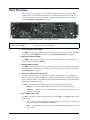
This section provides a general overview of the SPG-8260 components. The configurations
outlined in this section should be performed before installing the card in the frame, but may be
repeated as required. For details on the LEDs available on the card-edge, refer to the section
“Control and Monitoring Features” on page 3-3.
1
2
5
4
3
Figure 3.1 SPG-8260 — Card-edge Components
1) Function Select Switch (SW1)
3) Bootload Button (SW3)
2) Mode Select Switch (SW2)
4) Reference In/AES Out Jumper (JP2)
5) EXT TERM Jumper (JP1)
1. Function Select Switch (SW1)
Use SW1 to select general operation functions and menu items and works in conjunction with the
Mode Select Switch (SW2). Refer to the section “Card-edge Menu System” on page 4-7.
2. Mode Select Switch (SW2)
Use SW2 to enable, disable, and select specific configurations within the operational function
modes menu (selected first with SW1).
3. Bootload Button (SW3)
Use SW3 is used for factory service in the unlikely even of a complete card failure. Do not press
this button unless instructed to do so by Ross Technical Support personnel. Refer to the section
“Bootload Button” on page 6-2.
4. Reference In/AES Out Jumper (JP2)
An AES/Word Clock output, or a local reference input, is also available on one of the bottom
BNCs. Depending on the Rear Module you are using, the AES/Word Clock output or a reference
input is available on BNC 9 (8310AR-030, 8320AR-030 Full Rear modules), or the bottom BNC
(8320AR-031 Split Rear module).
Use JP2 to select the function of BNC 9 (bottom BNC). Select from the following:
•
REF IN — Select this option to enable the BNC to use the local reference input.
•
AES OUT — Select this option to enable the BNC to output an AES signal or a copy of
the Word Clock signal.
5. EXT TERM Jumper (JP1)
Use JP1 to terminate the signal on the Reference input when JP2 is set to REF IN. Select from
the following:
3–2 • User Controls
•
ON — Select this option to terminate the signal on the card. Note that it is recommended
to select this option when JP2 is set to AES OUT.
•
OFF — Select this option to leave the signal un-terminated (signal terminated externally
on the cable).
SPG-8260 User Manual (Iss. 01)