1
RUNNING A SEQUENCE
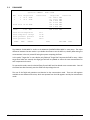
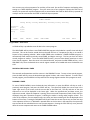
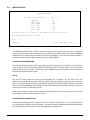
A sequence can be run manually or automatically through the TIMER CONTROL. To run a sequence manually, enter the
desired sequence information, or recall a previously saved sequence with the RECALL soft key. To start running the
sequence, press the START soft key. When a sequence is running, the current mode of operation (CONC, FLOW, VOLTS)
is displayed, along with "Operation: Program," indicating the mode is running under program control. The name of the
sequence, current sequence step, time, date, and time remaining will also be displayed at the bottom of the screen.
Pressing the ADVANCE soft key will cause the current step to stop, and the next step in the sequence will begin to run.
SYSTEM TEXT EDITOR
Lev 1
Lev 2
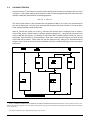
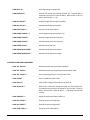
Use [+/-] key to change the case of the letter.
ABCDEFG HIJKLMN OPQRSTU VWXYZ-+ 01234 56789 CLEAR
A
B
C
D
E
F
G
EXIT
EXIT
Text Editor
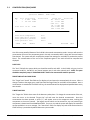
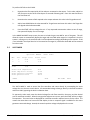
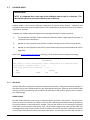
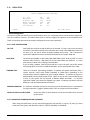
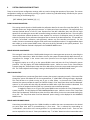
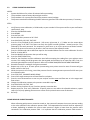
The system text editor is used to enter alphanumeric information into the system, such as program,
sequence or gas names. The system text editor appears automatically for any fields requiring alphanumeric
data. To enter text, select the letter or number group from the soft keys. This will display each letter in the
group above each soft key. Then, select the desired letter or number with the appropriate soft key. The left
and right arrow keys can be used to move the cursor within the text entry field. Pressing the +/- key while
the cursor is over a letter will toggle it between upper and lower case. Pressing the CLEAR key will clear any
text entered. When you are finished with the text entry, press the "EXIT" soft key to accept the text.
5.6.2
TIMER CONTROL (TIMER CTL)
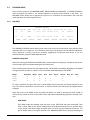
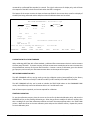
The TIMER CONTROL section of the PROGRAM MODE is used to program the system to run selected
sequences at specific times and days of the week. Once a TIMER CONTROL program is started, the system
will run each specified sequence at its appropriate day and time. After all sequences in the week are
complete, the system will loop back to Sunday and start the week again. To use this mode, sequences must
first be created and saved (See the SEQUENCE section above).
CREATING A TIMER
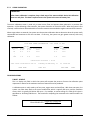
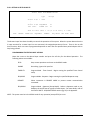
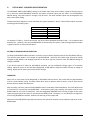
Under the desired day of the week, enter the number of the sequence that is to be run. Once the number
has been entered, the first 5 characters of the name will be displayed next to the number. Next, enter the
time of day for this sequence to start. The time is based on a 24-hour clock, where 12:00 is noon, and 24:00
is midnight. A time of 00:00 will cause the system to skip this sequence, and make it disappear from the
display, unless the cursor is positioned in that location. Once the start time is entered, the system will
display the duration of the selected sequence and compute the time it will finish.
Environics Series 9100
- 19 -
Revision 8, April 2013