1
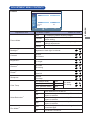
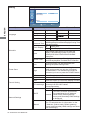
Sound
Sound
Sound Mode
Treble
Bass
Balance
Surround
Speaker
Audio Source
Dynamic
0
0
Center
Off
Internal
Audio1
Reset
Adjustment Item
Sound Mode*1
ENTER
:Enter
EXIT :Exit
Problem / Option
Enhances treble and bass.
Standard
Flat settings.
Custom
Recalls customized settings.
Treble*2
Too weak
Too strong
Bass*2
Too weak
Too strong
Balance*1
Left side speaker louder
Right side speaker louder
Surround*1
Speaker
Audio Source
Reset
Button to Press
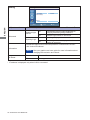
Dynamic
On
Surround is turned on.
Off
Surround is turned off.
Line-out
Select the Line-out.
External
Select the External Speaker.
Internal
Select the Internal Speaker.
Audio1
Select the Audio1 input.
Audio2
Select the Audio2 input.
HDMI
Select the HDMI input.
DisplayPort
Select the DisplayPort input.
Cancel
Return to Menu.
OK
Resets all settings in the Sound menu.
*1 Sound Mode, Balance and Surround are disabled when the Line-out (Speaker) is active.
*2 Treble and Bass are disabled when the Line-out (Speaker) or Custom (Sound Mode) is active.
OPERATING THE MONITOR 23
ENGLISH
:Move