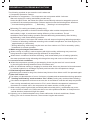
1
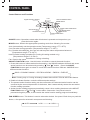
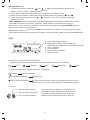
ADJUSTING button:
1. Temperature adjust: Press the " "and" " to adjust the temperature except under
Assist Function, Timer or Checking setting mode.
2. Timer adjust: Adjust the timer on/off time under the Timer setting mode.
3. Assist function selection: Select the desired assist function by pressing " "and" ".
4. Under the Checking mode, press " "" " to check T1, T2, T3, protection code and
malfunction code.
TEST RUNNING button: This button is specially designed for maintenance technicians. Press
this button will enter force cooling operation, press it again to close the test running. If
malfunctions occur during test running or air condition operating ,press ADJUSTING button to
display the maintenance information .
LOCK button: When you press the LOCK button the first time, all the current settings are locked
in but the remote controller operation is available. Push this button again to cancel the LOCK mode.
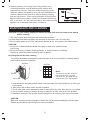
LCD
C
B
A
D
TIMER ON TIMER OFF
c
h
auto
T1 T2 T3 T4
$
F
E
A. Indoor fan speed indicator
B. Temperature setting, timer setting and
maintenance or malfunction information indicator
C. Timer indicator
D. Lock indicator
E. Assist function indicator
F. Mode indicator
Meanings of symbols are as shown below:
1. Modes (Select appropriate operation mode, see"Manual operation" for details)
Auto AUTO
DRY
COOLING
HEATING
FAN
2. Assist functions (see"Manual operation" for details)
SWING
Equally big airflow
$ECONOMIC RUNNING
ELECTRICAL HEATING
Save energy
Auxiliary electric heater, rending rapid heating up even in cold
winter (Only for the cooling & heating type with Electric heater)
3. Others
First Fan Speed Symbol
Second Fan Speed Symbol
Third Fan Speed Symbol
The low-frequency flashing cycle of the three
fan speed symbols indicate low fan or Auto fan.
The high-frequency flashing cycle of the fan
speed symbols indicate high fan or Auto fan.
4