1
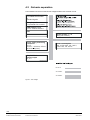
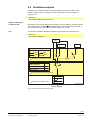
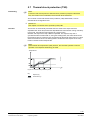
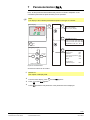
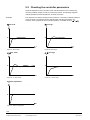
Parameterization PArA 7 Here, set the parameters associated directly with the controller’s adaptation to the controlled system after the plant has been put into operation. Note! The display of the individual parameters depends on the type of controller. Basic display Enter Enter 7866d12e/0212 OPr Enter PArA User level OPr SP1 or SP2 (editable) InP1 or Y (only display) Parameter level PArA Heating controller: HYS1, HYS2, HYS3 Cooling controller: HYS4, HYS5, HYS6 Only RWF50.2: Pb1, dt, rt, db, tt ESC >2 s or timeout Navigation principle Enter ConF One level back One level down Enter ESC Configuration level ConF Analog inputs: InP1 Controller: Cntr Thermal shock protection: rAFC Binary inputs: binF Display: diSP Only RWF50.3 Controller outputs: Next/previous parameter OutP Figure 22: Parameterization Access to this level can be locked. * * * Reference! See chapter 8.6 Display diSP. From the basic display, press so that OPr appears so that PArA appears Press Press Enter Enter so that the first parameter of the parameter level is displayed 39/64 Building Technologies Division Infrastructure & Cities Sector User Manual RWF50... 7 Parameterization PArA CC1U7866en 25.07.2014