1
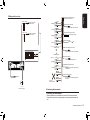
16-Pin Connector Extension Lead
(attached to the source unit)
Black
White
REAR LEFT / SUB OUT 1
Rear audio output (Left)/
Subwoofer output 1
Gray
Front Right
Gray/Black
White
Brown wire (Phone mute lead)
English
7) Wiring and Connections
Connect to cellular phone mute lead.
Front Left
Black
Red
REAR RIGHT / SUB OUT 2
Rear audio output (Right)/
Subwoofer output 2
White/Black
Purple
Rear Right
Yellow wire (Memory back-up lead)
Connect directly to battery
FUSE 15A
Purple/Black
Green
Rear Left
Red wire (Power lead)
Accessory
12V
Green/Black
4-Speaker system
or
Blue/White wire (Amplifier turn-on lead)
Connect to remote turn-on lead of amplifier
2-Speaker system
Black wire (Ground lead)
2 Channel Amplifier
Gray
Front Right
White
Front Left
Connect to vehicle chassis ground
Gray/Black
White/Black
Orange/White wire (Illumination lead)
Connect it to the car power supply terminal
for illumination
Purple
Purple/Black
(Black)
Antenna
Green
Not used.
Insulate each wire
Refer to next page
Blue wire (Auto antenna lead)
Connect it to the car power supply terminal
for antenna
Green/Black
8) Connecting the Accessories
•Connecting to the external amplifier
External amplifiers can be connected to the 2 channel RCA output connections.
Ensure that the connectors are not grounded or shorted to prevent damage to the
unit.
CZ202A/CZ202AR
13