1
provide you with the scores you entered for
each student.
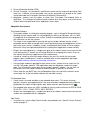
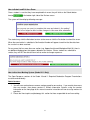
9. The system saves the score each time you go
to the next question, and it will notify you once
you have reached the end of the students, or
once you have finished the last unmarked
question. You should click on "Next Un-scored
Student" and "Previous Un-scored Student"
once before you go to the next written response
question to be sure that you haven't missed
any.
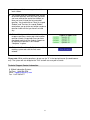
10. Click on "Assignments" to return to the written
response questions screen and select another
question to mark (if required).Once you have
completed marking all the students responses
for a particular question, it will indicate
“Complete” in green.
11. Click on the “Save & Log Out” button to exit the
marking system and save the final score
entered.
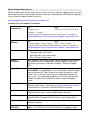
Please note: While marking questions, do not use the "X" in the top right corner (the web browser
exit). The system will not recognize the "Exit" and will not save your last mark.
Technical Support Contact Information
A. Willock Information Systems
Toll Free: 1-866-558-5339
Email: support@awinfosys.com
Fax: 1-847-589-4277
15