1
Product components
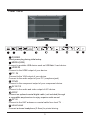
Front view
1
2
3
4
5
Remote Inductor and Power Indicator
INPUT
Switch the input sources .
MENU
Press the button to enter on screen Display (OSD).
CH /
Increase or decrease channel numbers.
VOL /
Increase or decrease the volume.
POWER
Turn the TV on or off.
2