1
PANEL DESCRIPTIONS
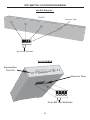
Sender Unit
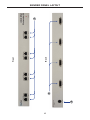
1
CAT-5 Video / DDC (1 - 4)
Connect a pair of CAT-5 cables from each set of RJ-45 jacks (Video/DDC) on
the Sender unit to the respective RJ-45 jacks on the DVI CAT5 MS Receiver
unit.
2
24V DC
Connect the included 24V DC power supply to this power receptacle and
connect the AC power cord to an available electrical outlet.
3
DVI In (1-4)
Connect up to four computers (or other DVI sources) to each of these DVI ports
on the Sender unit.
Receiver Unit
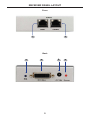
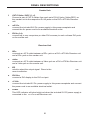
1
DDC
Connects a CAT-5 cable between a DDC jack on a DVI CAT5 MS Receiver unit
and a DDC jack on the Sender unit.
2
Video
Connects a CAT-5 cable between a Video jack on a DVI CAT5 MS Receiver unit
and a Video jack on the Sender unit.
3
EQ
Used to adjust the output signal. Refer to the DVI CAT5 MS User Manuall for
more information.
4
DVI Out
Connect a DVI display to the DVI Out port.
5
+5 Vdc
Connect the included 5V DC power supply to this power receptacle and connect
the power cord to an available electrical outlet.
6
Power
This LED indicator will glow bright red when the included 5V DC power supply is
connected to the DVI CAT5 MS
S Receiver unit.
6