1
Software Example 1
7 Software Example 1
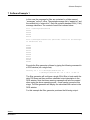
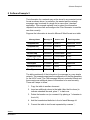
In this case the message list files are contained in a folder named
“messages” on the C: drive. The wanted message list is “wanted.txt” and
the network list is “network.txt”. Each file contains standard CAN (11 bit)
message identifiers. The content of each file is shown below:
File c:\messages\wanted.txt
0x245
0x256
0x392
0x376
File c:\messages\network.txt (This must contain all the messages
in wanted.txt too)
0x067
0x068
0x069
0x123
0x245
0x256
0x257
0x376
0x392
0x393
Execute the filter generator software by typing the following command in
a DOS window (on a single line):
mscanfg -nf 1 -w c:\messages\wanted.txt -m
c:\messages\network.txt -iw 1 -im 1 -t 100 -d
The filter generator will configure a single 32-bit filter to best match the
data 100 times and then produce a detailed output description in the
DOS window. Note that some warning messages will also be created
when using the above operating mode – these can be ignored at this
stage. The filter generator will display the calculated filter values in the
DOS window.
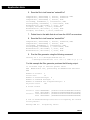
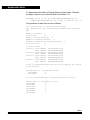
For this example the filter generator produces the following output:
AN2010
MOTOROLA
7