1
GC2450 User Manual
70-0037A-D
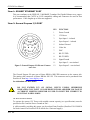
Isolated Ground
Isolated Ground must be connected to the user’s external circuit ground if Sync Input 1 or Sync
Output 1 is to be used.
Signal Ground
Signal Ground must be connected to the user’s external circuit ground if Sync Input 2 or Sync
Output 2 is to be used or if the RS-232 port is to be used. Note that Signal Ground is common
with Power Ground however it is good practice to provide a separate ground connection for
power and signaling when designing the cabling.
Video Iris
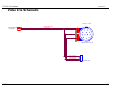
This signal can be used to drive the video input of a video iris lens. See Addendum.
DNC
These signals are reserved for future use and should be left disconnected.
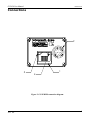
Item 3: Status LED 1
LED COLOR
STATUS
Solid Orange
Ethernet link established.
Flashing Orange
Ethernet activity.
Item 4: Status LED 2
LED COLOR
STATUS
Solid Green
Normal operation.
Flashing once per second
Boot up pending
3 quick flashes once per
second.
Camera fault.
AVT Inc.
8