1
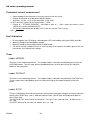
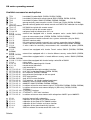
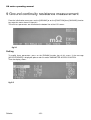
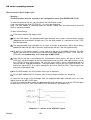
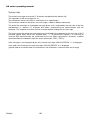
• the « L » letter is followed by a number between 1 and 8 , giving the test step number
and then by a « space ».
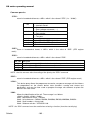
• then comes a letter according to the type of the test step :
Function
French
English
Insulation
M
M
Dielectric strength
R
H
Continuity
C
G
Void
..
..
Pause
OK.
OK.
German
M
H
E
..
OK
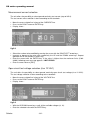
• the measurement type is followed by the memory number which contains the
•
•
•
•
measurement parameters , then by a separator character « : »
if the test step is void , the measurement will be replaced by a « space »
otherwise , the next character gives the test step result :
• « space » indicates that the test is good
• « q » indicates that the test is bad
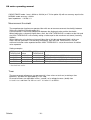
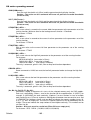
for the insulation and dielectric strength tests the previous character is followed by 1
‘space’ and for the ground continuity test by 2 ‘space’.
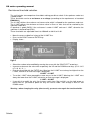
then the numerical values are given . When the value cannot be measured ( no continuity
or overload ) the numerical indication is replaced by « ---- »
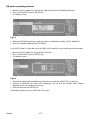
To check if a tested specimen is good or bad at the end of a sequence , it is necessary to
check the STB register ( bit 3) .To get the result of each test step , check if the result
character is « space » or « q ».
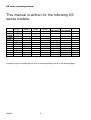
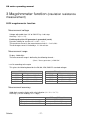
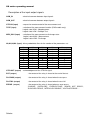
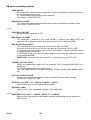
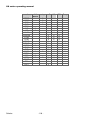
RS232 / IEEE-488 commands summary
Code
REM
*CLS
*ESE
*ESE?
*ESR?
*IDN?
*LRN?
*RST
*SRE
*SRE?
*STB?
*TST?
GTL
LLO
ACC
ACV
CONF
DCV
Sefelec
Init
menu
X
X
X
X
X
X
setup
m
kV
X
X
X
X
X
X
X
X
X
X
X
X
X
X
X
X
X
X
X
X
X
X
X
X
X
X
X
X
X
X
X
X
X
X
X
X
X
X
X
X
X
X
X
X
X
X
X
X
X
X
X
X
X
X
X
X
X
X
X
X
X
X
X
- 108 -
M
X
X
X
Seq.
X
X
X
X
X