1
Setup CRON Job for Automatic Mobile Detection Updates
The CRON job consists of a PHP page (cron-wurfl.php) that will be called periodically to update
the detection databases with new carriers, mobile devices and browsers.
Login into cPanel and find the ‘Cron jobs’ page
Setup a Cron Job, that will run once a day. You have to provide the complete server path to
the 'cron-wurfl.php' page from the root of CPV Lab.
Then enter as command:
cd /home/<server-name>/public_html/cpvlab/; php cron-wurfl.php
Or by an alternate command if the command above doesn’t function properly on your server.
php /home/<server-name>/public_html/cpvlab/cron- wurfl.php
***Replace <server-name> with the correct Server Name based on your server configuration.
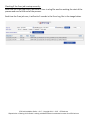
In the attached image you can see the Cron job being scheduled to run every day at 6:40 AM.
Click the ‘Add New Cron Job’ button and the new Cron job will appear in the jobs list.
CPV Lab Installation Guide – v2.17 - Copyright 2010 – 2015 CPVLab.com
Reproduction or Sharing of this Guide is strictly prohibited without the authorized consent from CPVLab.com