1
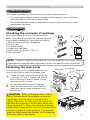
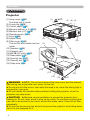
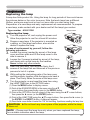
Projector features / Preparations Projector features The projector provides you with the broad use by the following features. ü T he unique optics system produces a large projected image in a short distance, which provides you with various ways of use. ü The double layer filter system is expected to function longer and offers you less maintenance frequency. Preparations Checking the contents of package Your projector should come with the items shown below. Check that all the items are included. Require of your dealer immediately if any items are missing. (1) Remote control with two AA batteries (2) Power cord (3) Computer cable (4) Lens cover and Strap (5) User’s manuals (Book x1, CD x1) (6) Security label (1) VIDEO ASPECT MAGNIFY ON AUTO FREEZE SEARCH BLANK PAGE UP VOLUME 㧗 DOWN OFF KEYSTONE (4) MY SOURCE/ COMPUTER DOC.CAMERA MY BUTTON 1 2 MUTE MENU POSITION ENTER ESC RESET (2) (5) (3) (6) NOTE • Keep the original packing materials, for future reshipment. Be sure to use the original packing materials when moving the projector. Use special caution for the lens. Fastening the lens cover Strap hole To avoid losing the cover, please fasten the lens cover to the projector using the included strap. Lens cover Strap slit the strap to the strap hole as shown 1. Fasten in the figure for step 1. Please note that the knot on the strap is used to fasten it to the lens cover in step 2 below. 2. Put the strap end into the slit of the lens cover with the knot on the side of the lens. Make sure that the strap is inserted to the end of the slit. 1 CAUTION ►Do not hang the lens cover in front of the lens when the projector is mounted upside down such as when mounted on the ceiling. Otherwise, the lens cover may block the light from the projector or hit the lens, which may cause damage to it. When mounting the projector upside down, hang the lens cover on the side of the projector or place it on the projector. For instance, wrap the strap around the elevator foot to hang the lens cover (refer to the figure). 2 Strap 3