1
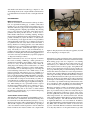
(a) Assemble Clutch
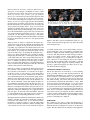
(b) Test and adjust clutch
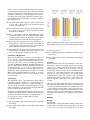
(c) Install spark plug
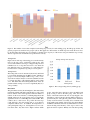
(d) Configure wiring
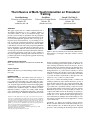
Figure 3: The four different sub-tasks (3a - 3d) shown on the physical bicycle apparatus (top), and in the virtual environment
(bottom).
we focus on 2D multi-touch gestures. We aim to expand
upon these results in virtual procedural training by exploring whether multi-touch interaction, which leverages realistic
gestures, can perform as well as training on the real equipment.
TRAINING SYSTEMS AND TASK
The selected experimental task consisted of assembling and
testing part of a 2-stroke bicycle-mounted engine (shown in
Figure 2). The apparatus and task were selected based upon a
number of constraints: (1) the task should use tools, parts and
gestures that would be applicable to industrial, defense, or
medical tasks, (2) the apparatus should be able to fit into our
lab, (3) the task should be safe for all participants to perform,
(4) the task should be significantly complex and non-obvious
that a layman could not complete it without prior training.
These constraints led us to repairing a 2-stroke bicycle engine
where participants could assemble, test and adjust the clutch
and other parts.
The overall task consisted of 22 steps grouped into 4
sub-tasks (shown in Figure 3): (1) clutch assembly, (2)
clutch functionality testing and adjustments, (3) spark plug
installation, and (4) wire configuration. Some examples of
the operations participants had to perform are: tightening
the clutch wheel nut to adjust the clutch plate, tightening
screws with a screwdriver, installing the spark plug with a
socket wrench, and plugging in wires. The task also required
verifying the correct clutch plate tightness, where the engine
needed to be disengaged with the clutch in and engaged with
the clutch out. If either of these conditions are not true the
clutch plate should be looser or tighter respectively. In total,
participants had to manipulate roughly 25 parts, and use
three different types of tools (shown in Figure 2b).
Motorized Bicycle
The physical apparatus was a motorized bicycle mounted on
a small stand to allow pedaling the bike freely in place for
testing purposes. The participants that trained on the physical bicycle had the advantage of experiencing the affordances
provided by each of the tools and parts involved in the task.
For instance, understanding the correct tightness of the clutch
plate is an important step in the process. This can be experienced by tightening the nut about 80% of the way and making
sure the clutch plate still has about 1/8” of movement. As described above, correct clutch plate tightness can be verified
by pedaling the bike with both the clutch in and the clutch
out. The user can verify the engine is disengaged visually
by looking at the gears and observing the relative easiness
of pedaling the bike. With the engine engaged, the user can
feel that the bike is more difficult to pedal and hear the engine making a chugging sound. The ability to examine the
parts and bike apparatus from any viewpoint or zoom level is
also an advantage the physical model provides. As described
above, the physical bicycle provides feedback in the form of
opposing forces and aural and visual cues.
Virtual Model and Multi-touch Interaction
The virtual environment contained a detailed, working model
of the bicycle, engine, components and tools involved (shown
in Figure 1). A tool bar was also provided so that if a user was
zoomed into a certain area of the bike they wouldn’t have to
zoom out to select a part from the table. Users could select
the tool or part needed from the tool bar and it would hover
next to the button. Each corresponding step in the task was
replicated in the virtual model and required interaction. We
ensured both the multi-touch and mouse interaction required
the same number of steps to complete the task.
Previous work on user-defined multi-touch gestures for 3D
objects influenced our multi-touch interaction model [4].