1
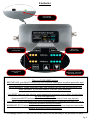
Control Panel: Understanding the Control Panel and LED lights
General: Mobile networks, phones and data devices operate in two frequency bands
(800Mhz & 1900Mhz). The Stealth Booster will amplify signals in both bands if they are
present. The band that the phone or cellular data device will transmit (TX) and receive (RX)
on is determined by the cellular provider and cannot be chosen by the user. The booster
LED lights will indicate outside signal level and booster gain. The ‘Master Control’ button
on the control panel will allow the user the option to increase gain, decrease gain or shut
off one or both of the frequency bands.
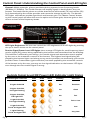
Receive Signal Power Level
(Orange LED)
Gain Level
(Green LED)
Master Control
Switch
Control Buttons for:
Manual Gain - 2dB steps
LED Light Brightness: the user can control the LED brightness of all LED lights by pushing
the up or down arrows on the control panel.
Receive Signal Power Level LED lights: three orange LED lights for each frequency band
receive signal (RX) power being amplified by the booster and transmitted into the building.
This indicator is affected by two things : the outside signal and attenuation that is applied
by the user or the automatic controls of the booster. The highest level signal being displayed by the booster lights can belong to any service provider, not necessarily your service
provider. Note: if attenuation (gain reduction) has been applied by the automatic controls
of the booster or by the user, you may see low signal indication on the booster LED lights
even though the true outside signal is strong.
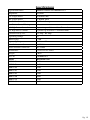
Outside Signal Level/RX Power LED Indicator Light States
Outside Signal Level LED
Pg. 8
LED1
LED2
LED3
Flashing
RX Power
3 Lights Solid ON
No
Excellent
2 Lights Solid ON,
3rd Light Flashing
Yes
Good
2 Lights Solid ON,
3rd Light OFF
No
Fair
1 Light Solid ON,
2nd Light Flashing
Yes
Fair to Low
1 Light Solid ON,
2nd & 3rd Lights OFF
No
Low
1 Light Flashing,
2nd & 3rd Lights OFF
Yes
Very Low
Pg. 7