1
DSTO-TN-0347
6.1.5.5 Applying Tolerances
When the “Apply Tolerances” checkbox is activated on the COMFRC data acquisition
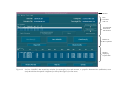
interface (Figure 12), certain checks are performed. Firstly, on the “Moving to Next
Setpoint” window (Figure 16), the current values of the test schedule parameters are
compared with the setpoints. If they are within the tolerance specified in the test
schedule file the appropriate status field is coloured green and set to “Ready”. If the
tolerance is not met, the appropriate status field is coloured orange and set to “Adjust”.
Secondly, another check is performed when data is taken. If any of the recorded values
of the test schedule file parameters do not meet the corresponding tolerance on the
setpoint value, a warning window is displayed to prompt the user to either accept or
reject the data.
If the “Apply Tolerance” checkbox is NOT activated, there is no indication of whether
the current parameters are at their setpoint values, and the data is taken regardless of
whether the parameters are near the setpoint values.
6.2 Off-Line Force and Moment Calculations
Off-line force and moment calculations are used to reprocess raw data files and
produce a new results output file. They may be performed with the original
configuration file used to record the data file’s contents or a different configuration file
if a change has been made.
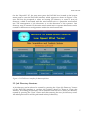
To begin an off-line force and moment calculation, the user must select the “OFF-LINE
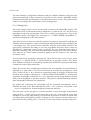
Force and Moment Analysis” button on the DATAIN interface. A small dialog window
will appear as shown in Figure 14, which prompts the user for two files. A data file,
which contains all raw data recorded during a test, must be selected from the pull
down list. The configuration file associated with the data file will be selected
automatically from its pull down list. If the user needs to reprocess the data file with a
different configuration file, then the “Use Different Config File” checkbox should be
activated.
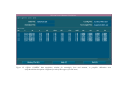
When the operator has selected the two files, the “OK” button must be activated. The
operator will be presented with the off-line COMFRC window as shown in Figure 15.
The data filename and configuration filename are placed automatically in their
respective text fields on the window. The raw data file will be reprocessed
automatically and each data line will be displayed on the data window.
Once complete, an output file containing the processed data will be generated with a
filename the same as the data filename but with a .out extension. This will overwrite
the previous results file in the ./results subdirectory located under the current job
directory. The raw data file remains untouched.
28