1
Installation and Setup
4.2 Data on the Serial port
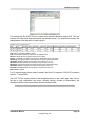
If you have the LeWL serial port connected to the PC, the terminal screen should display a line
of data each time it logs to the SD card (10 seconds, 1 minute or 10 minute intervals), as shown
below:
10-08-14,16:48:25,180,21.7,7.01,9.56,0.84,6.68,9.03,0.79,2.26
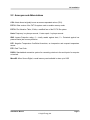
This data can be interpreted as follows:
10-08-14 = Date in dd-mm-yy format
16:48:25 = Time in 24h format
180 = Wind direction in degrees, 180º = south. Value increasing clockwise in 16 steps
21.7 = Temperature in degrees Celsius
7.01 = Average wind speed (m/s) for A1 during measurement period
9.56 = Maximum wind speed (m/s) for A1 during measurement period
0.84 = Standard deviation for A1 during measurement period
6.68 = Average wind speed (m/s) for A2 during measurement period
9.03 = Maximum wind speed (m/s) for A2 during measurement period
0.79 = Standard deviation for A2 during measurement period
2.26 = Battery voltage. Note that 2.26 volts is very low and batteries should be replaced.
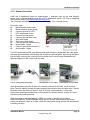
A rapid flashing LED at any time means there is a PROBLEM. If you leave the serial cable
connected you can confirm that the LeWL is working by seeing a line of the data written every
log interval, or an error message indicating the problem.
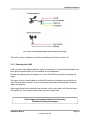
ALWAYS check that data is being recorded properly and the LeWL wind logger is
correctly set up before leaving the unit on site.
To check for correct operation, remove the SD card and check the data log file, or
connect a computer’s serial port to the LeWL as indicated in Section 3.3.2 and wait for
at least the first stream of data on the serial port. Check the number of anemometer
logged and the date and time is correct.
Do NOT leave the serial cable permanently connected. This will shorten battery life
considerably.
Installation Manual
Page 23
© Logic Energy Ltd.