1
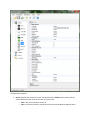
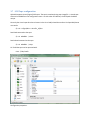
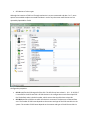
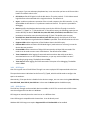
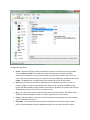
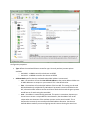
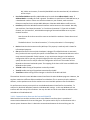
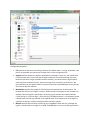
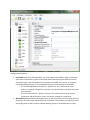
Some Alpha systems have one or two built in SCSI controllers. These controllers will be present in the resulting system even if they are not present in the Launcher GUI configuration. Since the number of available buses in the GUI depends on the number of controllers available in the GUI, the controllers must be present to make the buses available. The configuration of built-in controllers is given by qla0 and qla1. If the system does not have built-in controllers, then qla0 and qla1 cause controllers to be loaded in the available system slots. Configuration properties: The option SCSI ID specifies the SCSI ID of the controller. Values are 0 .. 15. The default value is 7. The option Slot specifies the PCI slot to which the adapter is plugged. The default behavior is automatic; thus, you do not have to specify this option or know about slots. The automatic behavior covers most cases with OpenVMS. Tru64, however, is very sensitive to changes in the hardware configuration. When you copy your disk images from the real system, it can be required to specify the slots in such a way to reflect the configuration of the real. However, we advise to reconfigure Tru64 and rebuild the kernel rather than playing with the slots. The number of slots depends on the actual emulated system. The mapping of the slots to PCI hoses and IDSELs also depends on the system. 3.5 Disk configuration New disks can be added using the Configuration menu. A disk can be removed or renamed by means of a context sensitive menu available on right-click on the device in the configuration tree. Note that the device name has no meaning for the system; it is only used for convenience. For instance, you can choose this name to be the disk label of the disk like mydatadisk, or the disk name in the SRM console like dka100, or the disk device name in your guest OS, like rz12. The disk image must exist before you can attach it to the emulator. A fresh disk image can be created by means of the Make Disk tool available in the Tools menu. The Make Disk tool just creates an empty disk image file. It does not attach it to the emulator. Therefore, you have to attach it yourself after creation. The disk configuration table enables configuration of the emulated disk properties.