1
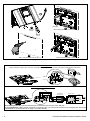
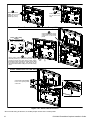
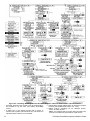
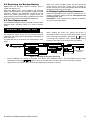
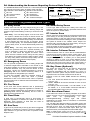
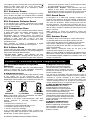
Power Cable Clamp Extraction
1
2
Thick cable
entry: Pull out a
d e sir ed w iri ng
plastic cap (1 of 4).
Extract cable clamp
for use in the next
step.
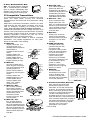
Power Connection for all Countries Except USA
2
Connect the power supply
output cable to the power
connector in the front
panel.
Power cable clamp
options
For thin For thick cable
cable (reversed clamp)
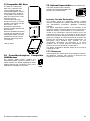
1
Safety
cover
Insert power cable through the desired wiring
channel (see step 1), route it to the power supply
unit and connect its 2 wires to the power supply
terminal strip with screwdriver. Fasten power cable
by its clamp (see also step 2 - this clamp can be
reversed to fit thick/thin cable) and close the safety
cover.
Power
supply
unit
(*)
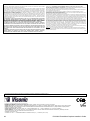
Power Connection for USA Only
Connect the power adapter
to the front panel power
connector.
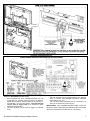
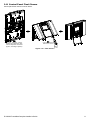
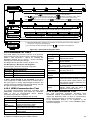
Figure 3.10 - Power Cable Connection
* Do not route wiring in this area, to enable proper closure of the control panel.
10
D-303983 PowerMaxComplete Installer's Guide